Scaling Google Shopping Without Tanking Efficiency
The tiered structure, feed optimizations, and bid strategies we use to scale Shopping profitably from $20K to $100K/mo. Internal playbook documentation turned into a guide.
Most Brands Can Scale Google Shopping. They Just Can't Scale It Efficiently.
Here's a pattern we see constantly:
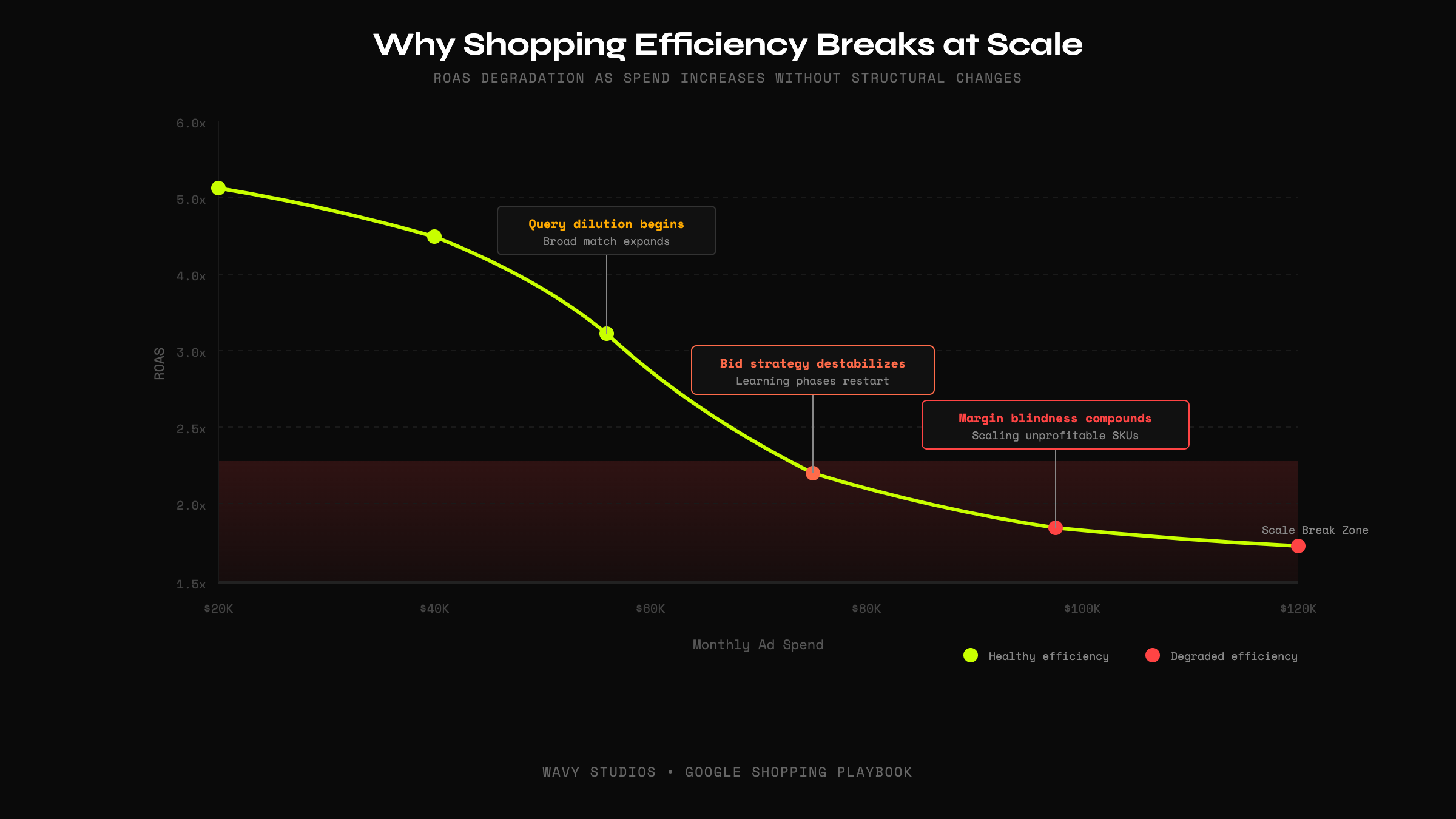
A brand runs Google Shopping at $20K/month. ROAS is strong, 4.5x, maybe 5x. The math works. Everyone's happy.
Then the CEO says "let's scale." Budget goes to $40K. ROAS dips to 3.8x. Still acceptable.
Budget hits $60K. ROAS craters to 2.4x. Panic sets in. Budget gets cut. The brand concludes that "Shopping doesn't scale."
They're wrong. Shopping scales. Their structure didn't.
The problem isn't the channel. The problem is that most Google Shopping accounts are built for a specific spend level. Push beyond that level without restructuring, and the system breaks.
This playbook documents exactly how we scale Google Shopping from $20K to $100K+ per month without efficiency collapse.
Why Google Shopping Efficiency Breaks at Scale
There are six structural reasons Shopping accounts lose efficiency when scaling:
1. Query Dilution
At low spend, Google shows your ads for high-intent, specific queries. As budget increases, the algorithm expands into broader, less qualified search terms.
2. Budget Fragmentation
Most accounts have too many campaigns splitting insufficient budget. Each campaign starves for data. The algorithm can't learn.
3. Bid Strategy Instability
Automated bidding needs consistent conversion volume to function. Scale the budget faster than conversions grow, and the algorithm destabilizes.
4. Feed Entropy
At low spend, feed quality is forgiving. At high spend, weak titles, missing attributes, and poor product data compound into significant performance drag.
5. Product Margin Blindness
Most Shopping accounts optimize for revenue, not profit. At scale, this means aggressively bidding on high-revenue, low-margin products.
6. Over-Reliance on Automation
Accounts that hand everything to automation have no levers to pull when performance degrades. They're passengers, not operators.
The Tiered Google Shopping Structure We Use
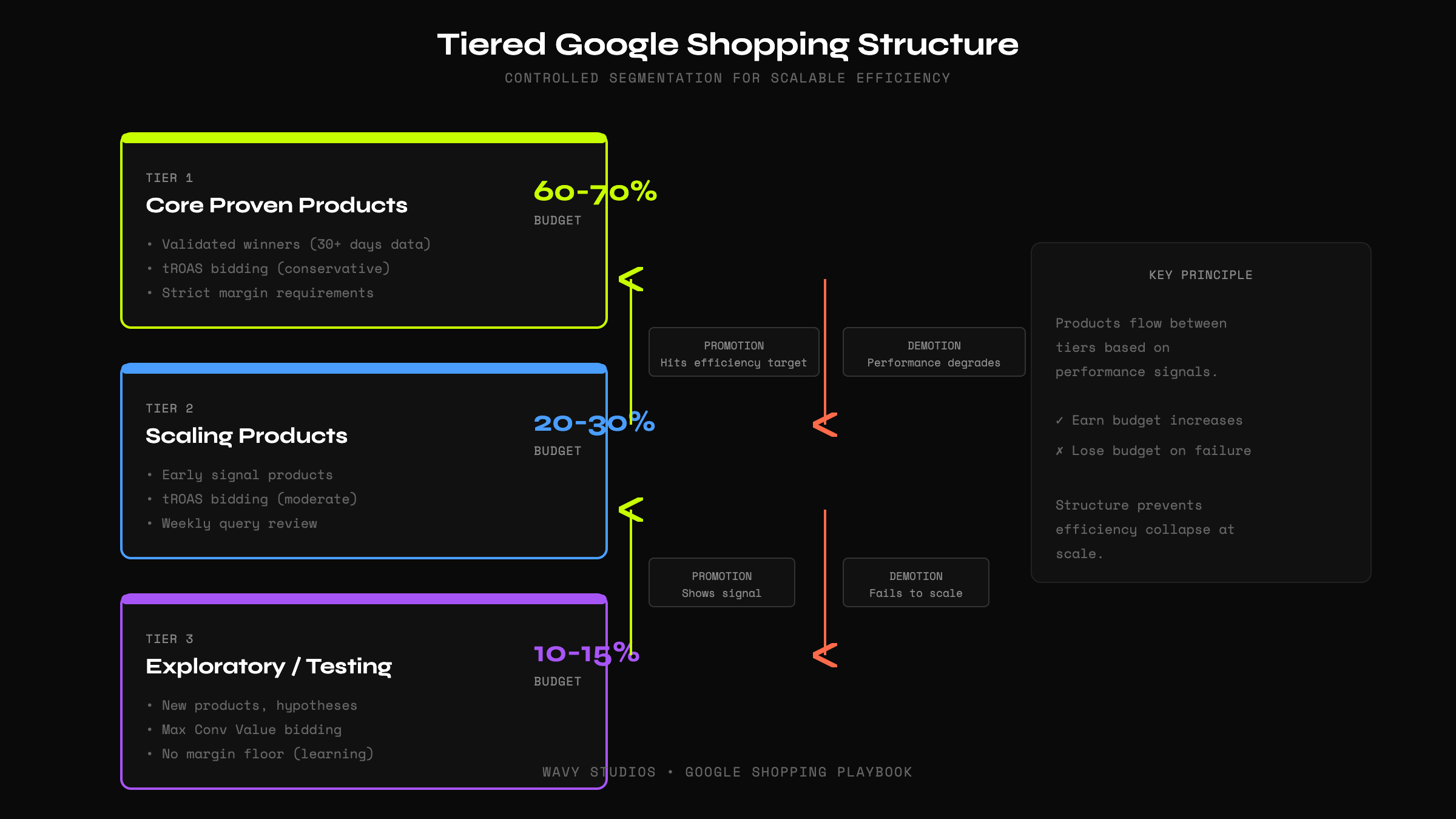
The solution to scaling collapse is controlled segmentation. We use a three-tier campaign structure that separates products by performance confidence.
Tier 1: Core Proven Products (60-70% of budget)
Objective: Maximize profit from validated winners.
- Separate campaign or asset group
- Highest budget allocation
- tROAS bidding with conservative target
- Strict margin requirements
Graduation criteria: 30+ days of data, 50+ conversions, ROAS consistently above target.
Tier 2: Scaling Products (20-30% of budget)
Objective: Validate emerging winners at increasing spend.
- Separate campaign with moderate budget
- tROAS bidding with slightly lower target
- Weekly query review to mine negatives
Tier 3: Exploratory / Testing (10-15% of budget)
Objective: Find new winners and test hypotheses.
- Separate campaign with capped budget
- Maximize conversion value bidding
- No margin floor (accepting unprofitability for learning)
Feed Optimization at Scale
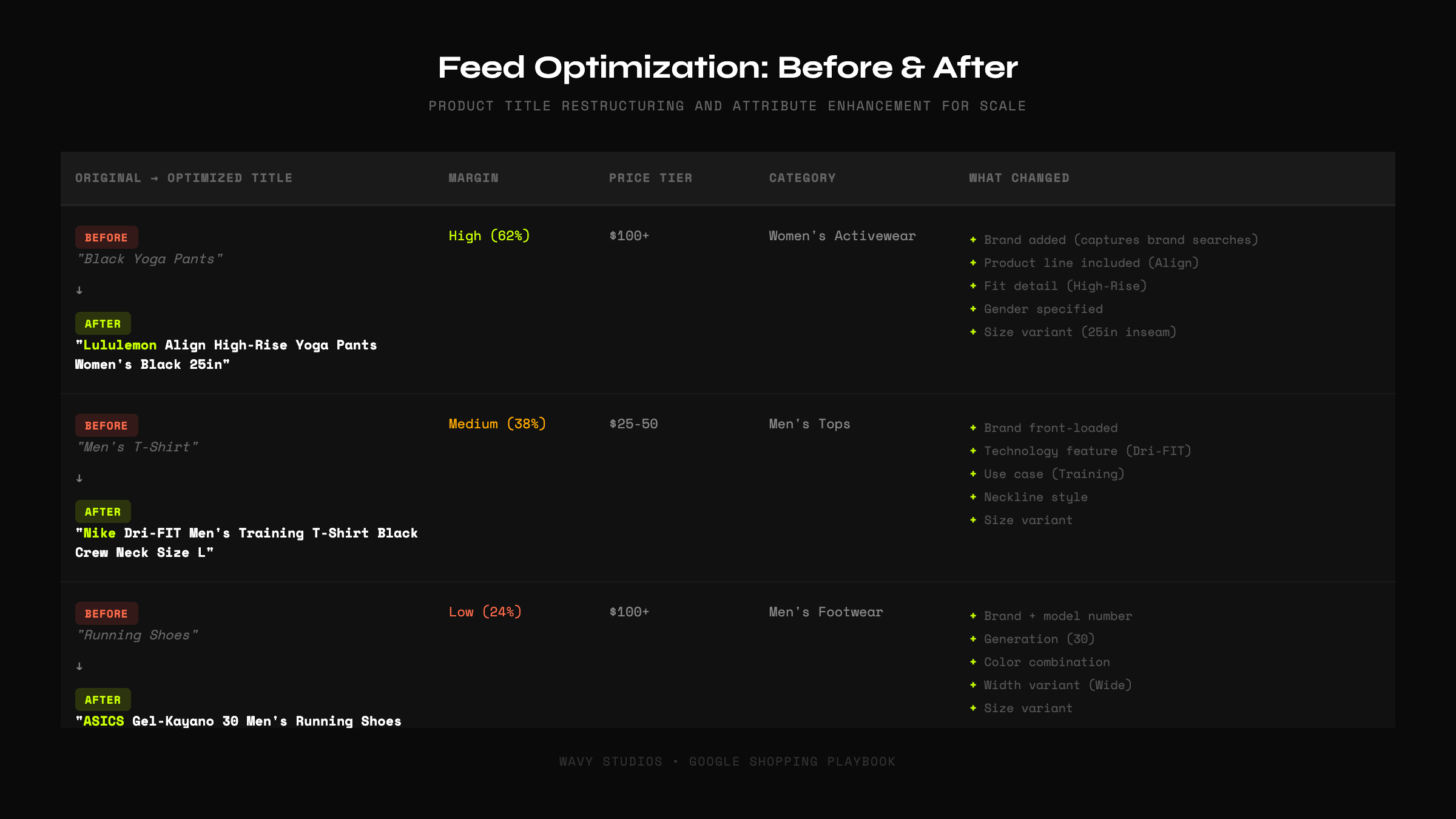
At $20K/month, you can have a mediocre feed and still perform. At $100K/month, feed quality is a multiplier, or a tax.
Title Structuring Formula
Custom Labels for Segmentation
- Custom Label 0: Margin tier (High / Medium / Low / Negative)
- Custom Label 1: Price band ($0-25 / $25-50 / $50-100 / $100+)
- Custom Label 2: Performance tier (Tier 1 / Tier 2 / Tier 3)
- Custom Label 3: Inventory status
- Custom Label 4: Strategic flag (Hero / Testing / Clearance)
Bid Strategy Logic: When to Use What
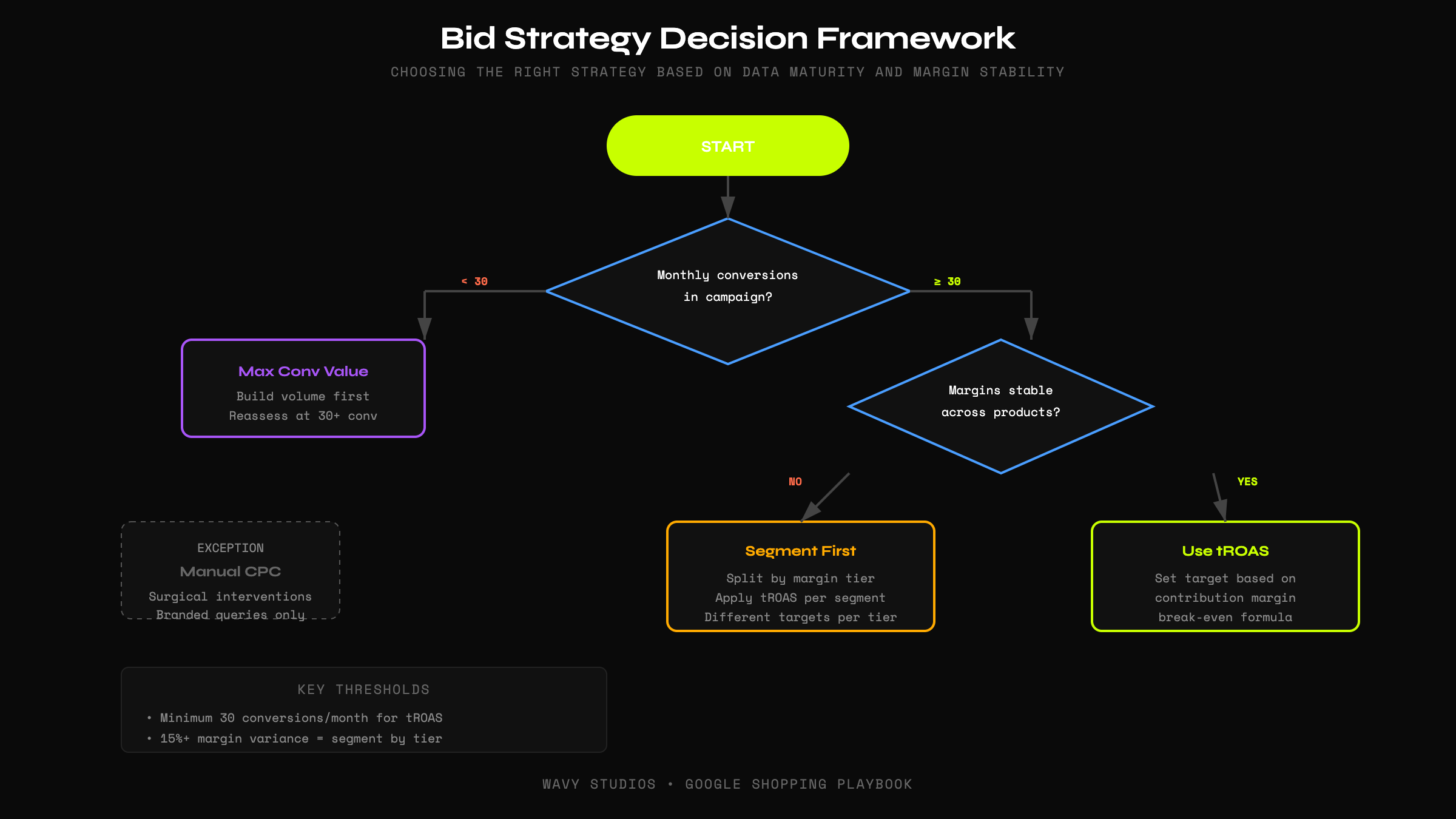
Target ROAS (tROAS)
When to use: You have 30+ conversions per month, stable margins, and a clear profitability target.
Maximize Conversion Value
When to use: New campaigns, testing phases, or when you need to build conversion volume.
Manual CPC
When to use: Rarely, reserved for branded queries or surgical interventions.
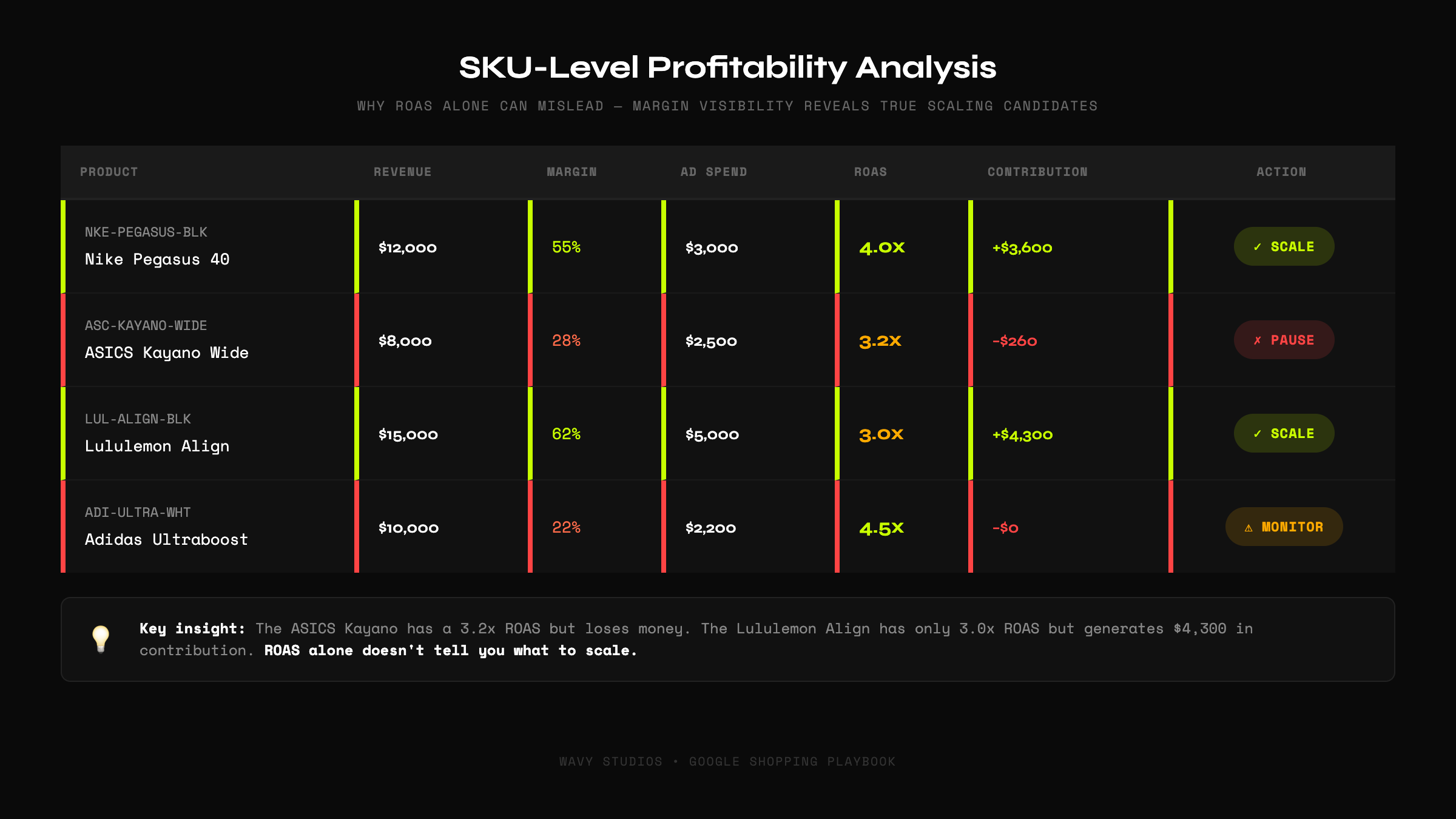
Margin-Aware Scaling
Revenue-based scaling is profit-blind.
If you're scaling based on ROAS alone, you're likely growing your worst-margin products faster than your best-margin products.
Implementing Margin Controls
- Calculate contribution margin for every SKU
- Tag products in your feed by margin tier
- Build campaigns around margin segments
- Set different ROAS targets by margin tier
- Review weekly as costs change
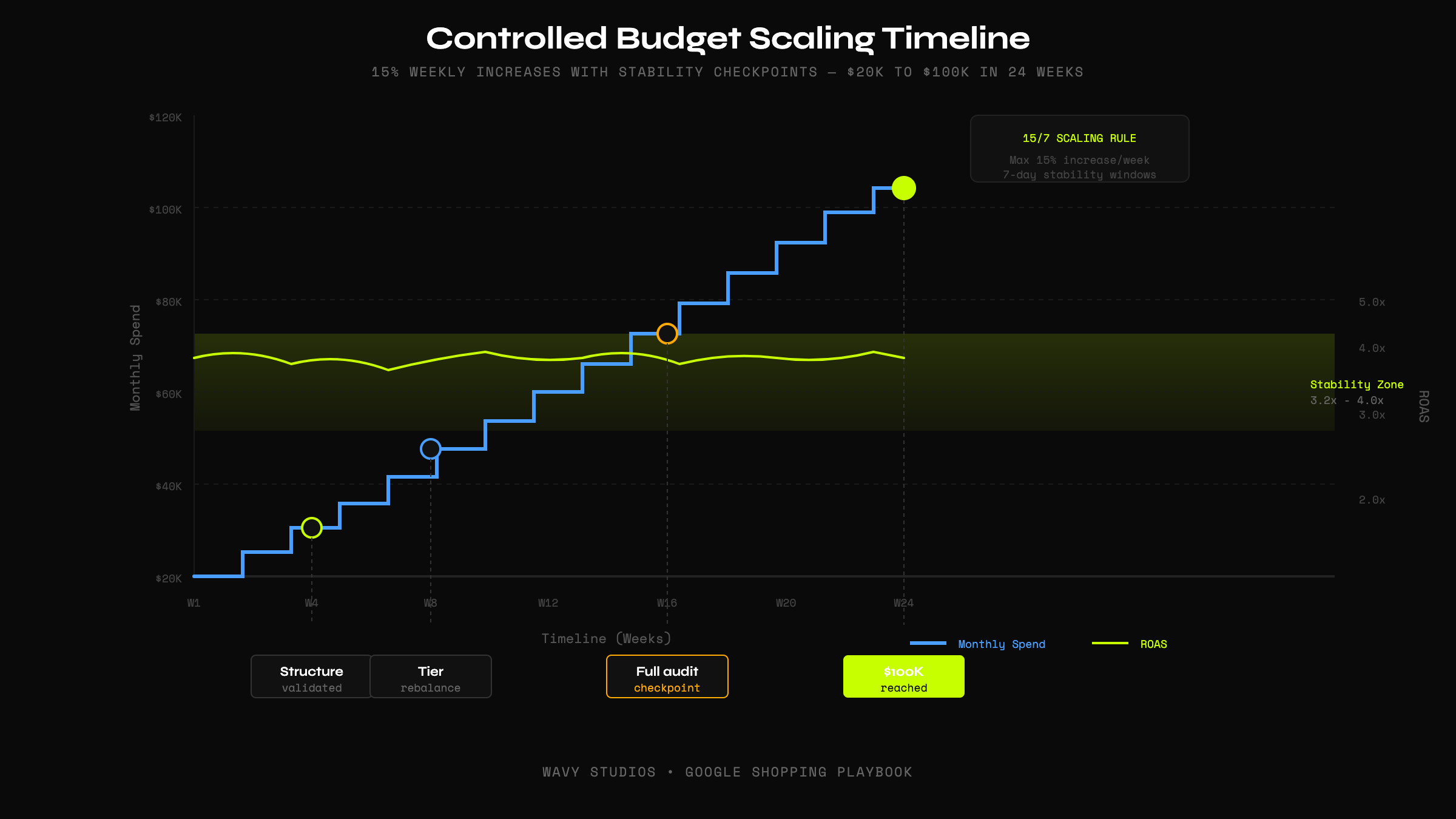
Controlled Budget Scaling Framework
The 15/7 Scaling Rule
Increase budget by no more than 15% per week. This gives the algorithm time to adjust without destabilizing.
Signal Thresholds Before Scaling
- ROAS is stable (within 10% of target for 7+ days)
- Conversion volume is consistent
- Query quality hasn't degraded
- No major auction shifts
Common Scaling Mistakes
- Increasing budget too quickly -- Respect the 15% rule
- Lowering tROAS aggressively -- Lower targets gradually
- Expanding feed without segmentation -- New products enter Tier 3
- Ignoring search term mining -- Review weekly at scale
- Not separating branded vs non-branded -- Track distinctly
- Treating PMax as "set and forget" -- Understand its Shopping component
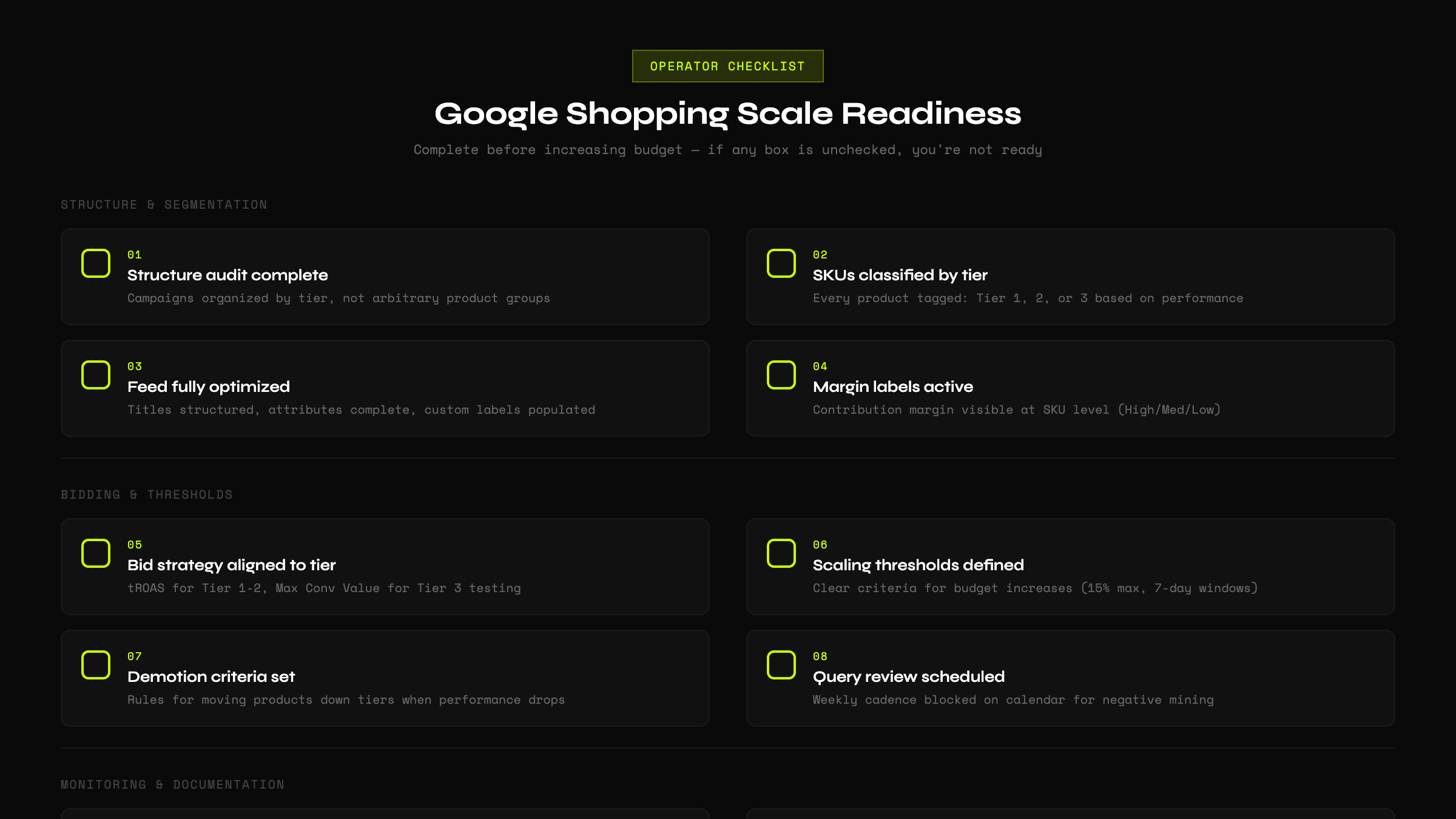
Operator Checklist: Scale Readiness
The Bottom Line
Scaling Google Shopping is not about spending more. It's about building a structure that can handle more.
Most accounts don't fail because Shopping doesn't scale. They fail because they scaled spending without scaling structure, controls, or discipline.
The brands that win at scale:
- Segment products by performance confidence
- Control queries through deliberate feed optimization
- Match bid strategies to data maturity
- Enforce margin visibility at the SKU level
- Scale systematically with stability checkpoints
This isn't magic. It's operational discipline applied to paid media.
Build the structure first. Then scale.
Ready to Scale Google Shopping Profitably?
Book a growth audit. We'll assess your structure, feed quality, and scaling readiness.
Book Your Growth Audit →